
Last week I wanted to create a 3D plot like the one below. I decided to use SciLab which is a pretty neat, free, close-but-not-exact clone of MatLab (which is much too expensive in my opinion). See http://www.scilab.org/ .
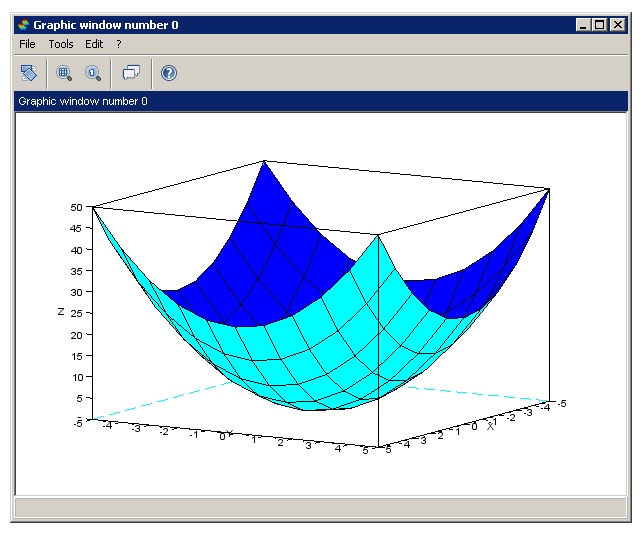
It turns out that generating a 3D plot was rather tricky. After installing SciLab (which was a breeze), I launched the SciLab shell/window to get to the –> SciLab prompt. Here’s how I created the 3D plot for the function f(x,y) = x^2 + y^2 shown below.
–>v = [-5:1:5]
v = -5 -4 -3 -2 -1 0 1 2 3 4 5
–>x = repmat(v,11,1)
x =
-5 -4 -3 -2 -1 0 1 2 3 4 5
-5 -4 -3 -2 -1 0 1 2 3 4 5
-5 -4 -3 -2 -1 0 1 2 3 4 5
-5 -4 -3 -2 -1 0 1 2 3 4 5
-5 -4 -3 -2 -1 0 1 2 3 4 5
-5 -4 -3 -2 -1 0 1 2 3 4 5
-5 -4 -3 -2 -1 0 1 2 3 4 5
-5 -4 -3 -2 -1 0 1 2 3 4 5
-5 -4 -3 -2 -1 0 1 2 3 4 5
-5 -4 -3 -2 -1 0 1 2 3 4 5
-5 -4 -3 -2 -1 0 1 2 3 4 5
–>y = x’
y =
-5 -5 -5 -5 -5 -5 -5 -5 -5 -5 -5
-4 -4 -4 -4 -4 -4 -4 -4 -4 -4 -4
-3 -3 -3 -3 -3 -3 -3 -3 -3 -3 -3
-2 -2 -2 -2 -2 -2 -2 -2 -2 -2 -2
-1 -1 -1 -1 -1 -1 -1 -1 -1 -1 -1
0 0 0 0 0 0 0 0 0 0 0
1 1 1 1 1 1 1 1 1 1 1
2 2 2 2 2 2 2 2 2 2 2
3 3 3 3 3 3 3 3 3 3 3
4 4 4 4 4 4 4 4 4 4 4
5 5 5 5 5 5 5 5 5 5 5
–>z = x.^2 + y.^2
z =
50 41 34 29 26 25 26 29 34 41 50
41 32 25 20 17 16 17 20 25 32 41
34 25 18 13 10 9 10 13 18 25 34
29 20 13 8 5 4 5 8 13 20 29
26 17 10 5 2 1 2 5 10 17 26
25 16 9 4 1 0 1 4 9 16 25
26 17 10 5 2 1 2 5 10 17 26
29 20 13 8 5 4 5 8 13 20 29
34 25 18 13 10 9 10 13 18 25 34
41 32 25 20 17 16 17 20 25 32 41
50 41 34 29 26 25 26 29 34 41 50
–>plot3d(v,v,z);
The first command, v = = [-5:1:5] creates a vector from -5 to +5, 1 unit at a time (11 values). These are the raw x and y values for the plot. The second command x = repmat(v,11,1) (“replicate matrix”) creates a matrix with 11 rows from the vector v. The tricky part about working with MatLab/SciLab is thinking in terms where everything is a matrix. For my function I need all possible combinations of x and y in a matrix. The third command, y = x’ creates a transpose matrix of x. The fourth command z = x.^2 + y.^2 creates a matrix where each entry is the corresponding x value squared times the y value squared. The . means square each entry rather than do a matrix multiplication. Finally I use the plot3d function to plot. The commands are simple (after the fact) but it wasn’t all that easy to figure out.
 .NET Test Automation Recipes
 Software Testing
 SciPy Programming Succinctly
 Keras Succinctly
 R Programming
 2026 Visual Studio Live
 2025 Summer MLADS Conference
 2026 DevIntersection Conference
 2025 Machine Learning Week
 2025 Ai4 Conference
 2026 G2E Conference
 2026 iSC West Conference
You must be logged in to post a comment.