
Consider the following very specific scenario. You have a SQL Server 2008 database and want to retrieve multiple data records from the database using WCF 4 hosted in IIS and display the results in a Silverlight 4 application hosted in a Web page. And you are using Visual Studio 2010 with C# and .NET Framework 4. Let me walk through one way to do this. If you look at the image below you can see the goal where I request employee ID, last name, and age of employees who are older than 25:
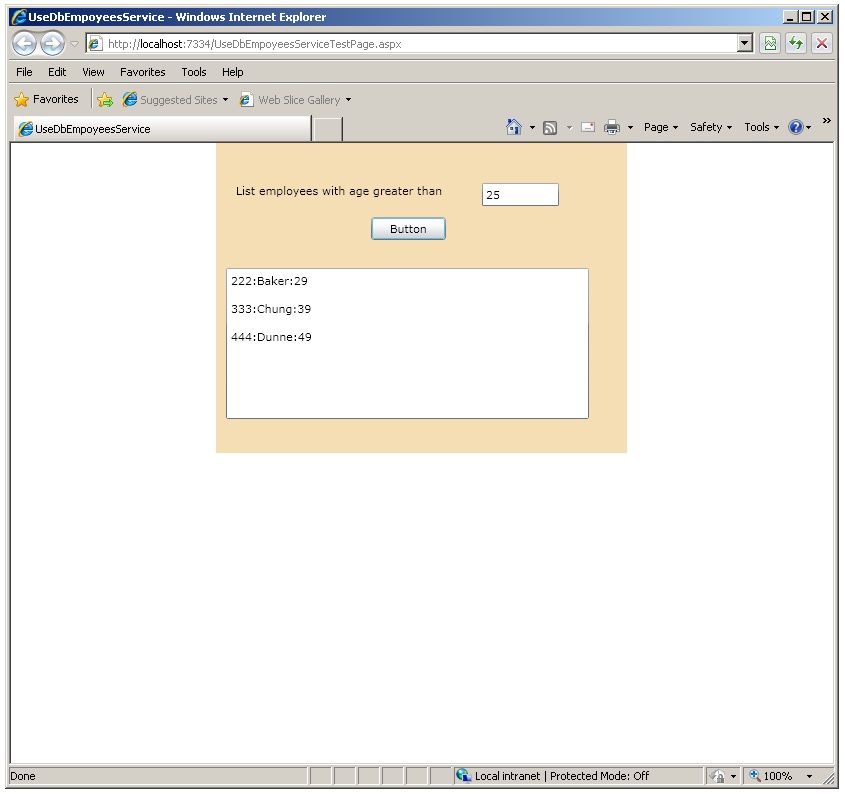
First I use SQL Server 2008 to create a dummy database named dbEmployees with a single table named tblEmployees and add four records:
use master
go
if exists(select * from sys.sysdatabases where name=’dbEmployees’)
drop database dbEmployees
go
create database dbEmployees
go
use dbEmployees
go
create table tblEmployees
(
empid char(3) primary key,
lastName varchar(12) not null,
age int
)
go
insert into tblEmployees values (‘111’, ‘Adams’, 19)
insert into tblEmployees values (‘222’, ‘Baker’, 29)
insert into tblEmployees values (‘333’, ‘Chung’, 39)
insert into tblEmployees values (‘444’, ‘Dunne’, 49)
go
Next I create a WCF service to expose the data. I launch an instance of Visual Studio 2010 as an administrator. I go File New Web Site. I select the WCF Service template, location type HTTP, and location http://localhost/WCFServicesRoot/DbEmployeesService. In file Service.cs I add “using System.Data.SqlClient;” and define a method that will retrieve the data for all employees whose age is greater than some age:
public string GetEmployees(int age) // info of all emps whose age >= age
{
try
{
string connString = “Server=vte;Database=dbEmployees;Trusted_Connection=True”;
SqlConnection sc = new SqlConnection(connString);
SqlCommand cmd = new SqlCommand(“SELECT empid, lastName, age FROM tblEmployees
WHERE age > ” + age.ToString(), sc);
sc.Open();
SqlDataReader sdr = null;
sdr = cmd.ExecuteReader();
string s = “”;
while (sdr.Read() == true)
s += sdr[0] + “:” + sdr[1] + “:” + sdr[2] + “&”;
sc.Close();
return s;
}
catch (Exception ex)
{
return ex.Message;
}
}
In file IService.cs, inside the [ServiceContract] block I define the retrieval method’s interface:
[OperationContract]
string GetEmployees(int age);
Now I can build the WCF service and it will be hosted inside IIS. Now I have to give WCF access permissions to the dbEmployees database. In SQL Server Management Studio, I go to the Security Logins area and double-click on the NT AUTHORITY\NETWORK SERVICE object. In the resulting Login Properties dialog I select the User Mapping tab then check dbEmployees to select it, and then at the bottom I check db_datareader and db_datawriter.
Next I hit the F5 key in Visual Studio. I get a Web page with information about the WCF service including its location:
http://localhost/WCFServicesRoot/DbEmployeesService/Service.svc
The next step is to create a Silverlight application that accesses the SQL data by using WCF. I launch a new instance of Visual Studio 2010 as an administrator. I go File New Project. Then I select a C# Silverlight application from the template list, give it Name UseDbEmpoyeesService at some convenient Location like C:\SilverlightProjects. I accept the defaults on the New Application dialog: Host the Silverlight application in a new Web site (yes) and Enable WCF RIA Services (no).
In file MainPage.xaml I add a Label control, TextBox control, Button control, and a ListBox control. In the XAML code I change the Grid background color to Wheat so I’ll be able to see where the Silverlight control is later on the host Web page.
Now I tell the Silverlight application about the WCF service. In Solution Explorer I right-click on the UseDbEmployeesService entry and select Add Service Reference from the context menu. In the dialog box I copy paste the location of the WCF service and click on Go. The dialog will list the Service. I like to rename the Namespace: from the default ServiceRefrence1 to DbEmployeesServiceRef. Adding the Service Reference adds all the WCF plumbing behind the scenes.
I double-click on the Button control to generate its event handler and the I add code:
private void button1_Click(object sender, RoutedEventArgs e)
{
DbEmployeesServiceRef.ServiceClient sc =
new DbEmployeesServiceRef.ServiceClient();
sc.GetEmployeesCompleted += new EventHandler<
DbEmployeesServiceRef.GetEmployeesCompletedEventArgs >(AddTheData);
sc.GetEmployeesAsync(int.Parse(textBox1.Text.Trim()));
}
private void AddTheData(object sender,
DbEmployeesServiceRef.GetEmployeesCompletedEventArgs ea)
{
string result = ea.Result;
string[] tokens = result.Split(‘&’);
for (int i = 0; i < tokens.Length; ++i)
{
listBox1.Items.Add(tokens[i]);
listBox1.Items.Add(“”);
}
}
Now I am good to go. I hit F5 to start the Silverlight application hosted inside a test Web page, enter an age in the TextBox, click the Button, and wait for the Silverlight app to send a request to the WCF service to get the data for employees who are older than the supplied age, and place that data into the ListBox.
There are a milion details I haven’t covered. Because my SQL Server, WCF Server, and Silverlight app are all on the same machine I don’t have to worry about cross domain security files ClientAccessPolicy.xml and CrossDomain.xml. If my result set from SQL is huge I might want to consider binary encoding with the GZipStream classto reduce the size.
 .NET Test Automation Recipes
 Software Testing
 SciPy Programming Succinctly
 Keras Succinctly
 R Programming
 2026 Visual Studio Live
 2025 Summer MLADS Conference
 2026 DevIntersection Conference
 2025 Machine Learning Week
 2025 Ai4 Conference
 2026 G2E Conference
 2026 iSC West Conference
You must be logged in to post a comment.